
Article ID: 041130sab
Last Reviewed: January 15, 2026
The information in this article applies to:
- Pronto for Windows all releases.
Target Audience
This Article is aimed at:
- All Pronto Users.
Summary
Communication between a computer and most Ranger or Power Master Data Loggers is over an RS232 link. However most modern computers do not provide an RS232 port, providing multiple USB ports instead. A USB to serial converter can be used to allow communication. This application note details those serial to USB converters that have been tested and found to work with Ranger Data Loggers.
See more details of Pronto, our Power Quality Monitoring Software.
Before you start
- The System must be running Windows 11/10/7/Vista.
Older Windows XP/2000 or the 9x series may work but are no longer supported. - Pronto for Windows must be release 5.20 or later.
Selecting a USB to Serial converter
There are many manufacturers of USB to Serial converters, however there are only a couple of different integrated circuits ( ICs ) available for all these manufacturers. To date only three different ICs have been found in all converters tested, these are listed below.
- Converter 1:
Interface chip: FTDI
FT232 Driver revision: 2.12.36.4 (July 2021).
Correct operation with Ranger 2 and its derivatives on Windows 11/10/7/Vista. - Converter 2:
Interface chip: PROLIFIC PL2303.
Driver revision: 3.8.41.0 (Nov 2021).
Correct operation with Ranger 2 and its derivatives on Windows 11/10/7/Vista. - Converter 3:
Interface chip: Magic Component Technology Corp.
Device Tested: Belkin F5U109.
Driver revision: 1.09 (Windows XP).
Results: runs for a few minutes then stops responding.
Recommendations
It is recommended that you use an converter that uses either the FTDI or Prolific USB to serial converter IC.
Ensure that you are using the most up to date drivers.
The FTDI drivers are available here.
The Prolific drivers are available here.
We have found that converter vendors web sites and installation media (CDROM) shipped with the converter are often out of date.
Some recommended USB to Serial converters
All the converters below are known to use the Prolific IC and work correctly with Pronto and Ranger Loggers. Bear in mind that converters that do not have thumb-screws are intended for use in combination with 9 way RS232 serial cables.
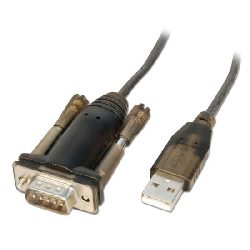 |
Lindy USB to Serial Converter Lite UK www.lindy.co.uk www.amazon.co.uk Australia www.lindy.com.au US www.amazon.com As of June 2019 we ship this for use with older PM3000s. |
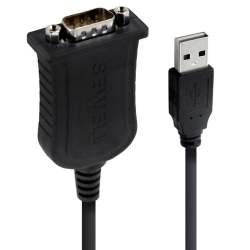 |
Sewell branded Serial to USB converter. Available in US from https://www.sewelldirect.com/usbtoserial |
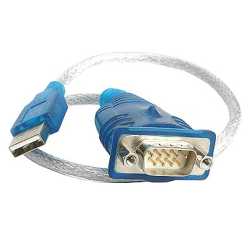 |
Branded StarTech, Product ID: ICUSB232V2 Available in US direct from StarTech https://www.startech.com/en-us/cards-adapters/icusb232v2 Also on Amazon.com https://www.amazon.com/USB-Serial-Adapter-Prolific-PL-2303/dp/B00GRP8EZU |
Known Issues with USB to Serial Converters
1) Unreliable communications after COM port number changed using in Windows Device Manager
If the Port number is changed manually in the Windows Device Manger to (for example) COM1 from COM9, then communication can become unreliable.
It is recommended that you avoid using the COM numbers COM1, COM2 or COM3 for a USB to Serial converter if changing the Port number manually.
2) Unreliable communication at 230400 baud
The Prolific USB to serial converter allows selection of 230400 baud, however some manufacturers devices distort the output data waveform and communication is unreliable.
The solution is straight-forward: Select a baud rate of 115200 instead.
3) USB to Serial Converter no longer supported
Applies to Older Prolific USB to serial converters, may show any of the following symptoms:
a) Message “Device does not exist” when trying to connect.
b) Port not found when searching for COM ports.
Cause:
Older Prolific Converters are not longer supported by drivers shipped with Windows 10 and 11.
In Windows Device Manager, device properties are “The device cannot start”.
In Windows Device Manager, device name includes “PL2303XXX PHASED OUT”