
Article ID: 090522sab
Last Reviewed: July 5, 2023
The information in the article applies to:
Target Audience
This article is aimed at:
- All Users and distributors of the PM7000.
Summary
The PM7000 has 3 different simultaneous recording regimes. A user may adjust the memory allocated to each regime so as to optimise the number of recordings that will fit in internal memory and the download times. This application note explains how memory is used by each regime and guides the user through the steps required to adjust memory use to suit their needs.
Memory Use by each recording regime
1) “Detail Recording”.
When using our patented Adaptive Store.
80 kbytes per channel per day gives a high level of detail.
50 kbytes per channel per day gives medium detail.
20 kbytes per channel per day gives low detail.
As more or less memory is allocated then the level of detail automatically adjusts to use what has been allocated over the recording period.
Example:
You want to record 16 channels with a high level of detail for 3 days.
Allocate 80 kbytes per day for 16 channels for 3 days. this is 80 * 16 * 3 which is 3840 kbytes.
When using traditional Point Store.
Each record uses approximately 1.25 bytes per channel.
If insufficient memory is allocated then the recording will finish early.
Example:
You want to record 16 channels at one second intervals for 3 days.
Allocate at least 1.25 bytes per record * 16 channels * 86400 seconds per day * 3 days. This is at least 5184 kbytes.
2) General Parameters around 500 channels recorded at a fixed interval.
Each record uses approximately 1 kbytes.
If insufficient is allocated then the recording will stop early. If too much is allocated it is not used.
Example:
You want to record 5 minute intervals for 3 days.
5 minute intervals is 12 records per hour so this will use 12 * 24 records or 288 kbytes per day. For three days allocate at least 900 kbytes.
3) Wave Capture.
In the PM7000 – S each 20 millisecond capture uses about 1 kbytes per channel.
In the PM7000 – H each 20 millisecond capture uses about 2 kbytes per channel.
In the PM7000 – T each 20 millisecond capture uses about 3 kbytes per channel.
Example:
You have a PM7000 – S and want to record the top 50 events on all 8 channels with a capture window of 160 milliseconds.
The capture window is 160 milliseconds which is 8 * 20 millisecs so this is 8 kbytes per channel per event.
For 8 channels this is 64 kbytes per event. For 50 events allocate 3200 kbytes.
How to adjust the memory usage in the PM7000
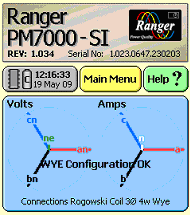
From the Introduction screen click on MAIN MENU
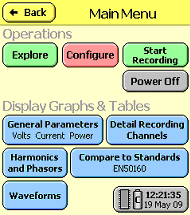
On the Main Menu screen click on CONFIGURE
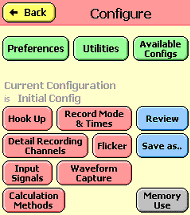
On the Configure screen click on MEMORY USE
On the Set Memory Allocation screen:
Adjust total memory usage by clicking on the first bar.
Adjust proportions by clicking on the second bar.
Using the example given in memory usage above, allocate 8 megabytes on the first slider with 50% to detail, 14% to general and 36 % to waveform.
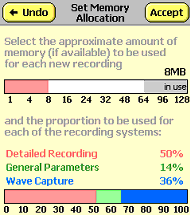
Click ACCEPT to go back to the Configure screen.
Then from the Configure screen click on WAVEFORM CAPTURE.
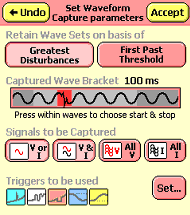
Adjust the Captured Wave Bracket by clicking on the slider.
Set all voltage and current channels to be captured by clicking on the buttons as shown below.
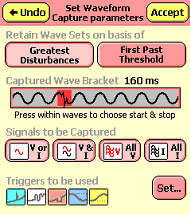
Click ACCEPT on the Set Waveform Capture parameters screen to go back to the Configure screen.
Finally click BACK on the Configure screen to return to the Main Menu.
See also: APPNOTE: A Description of the Adaptive Storage Technique